

CRM & Pipelines

Know what happened to the lead who called last Tuesday.

A list of every lead, a board of every deal, and a timeline that fills itself from forms, chats and payments.

Instead of: The Excel sheet, the diary, Zoho CRM.
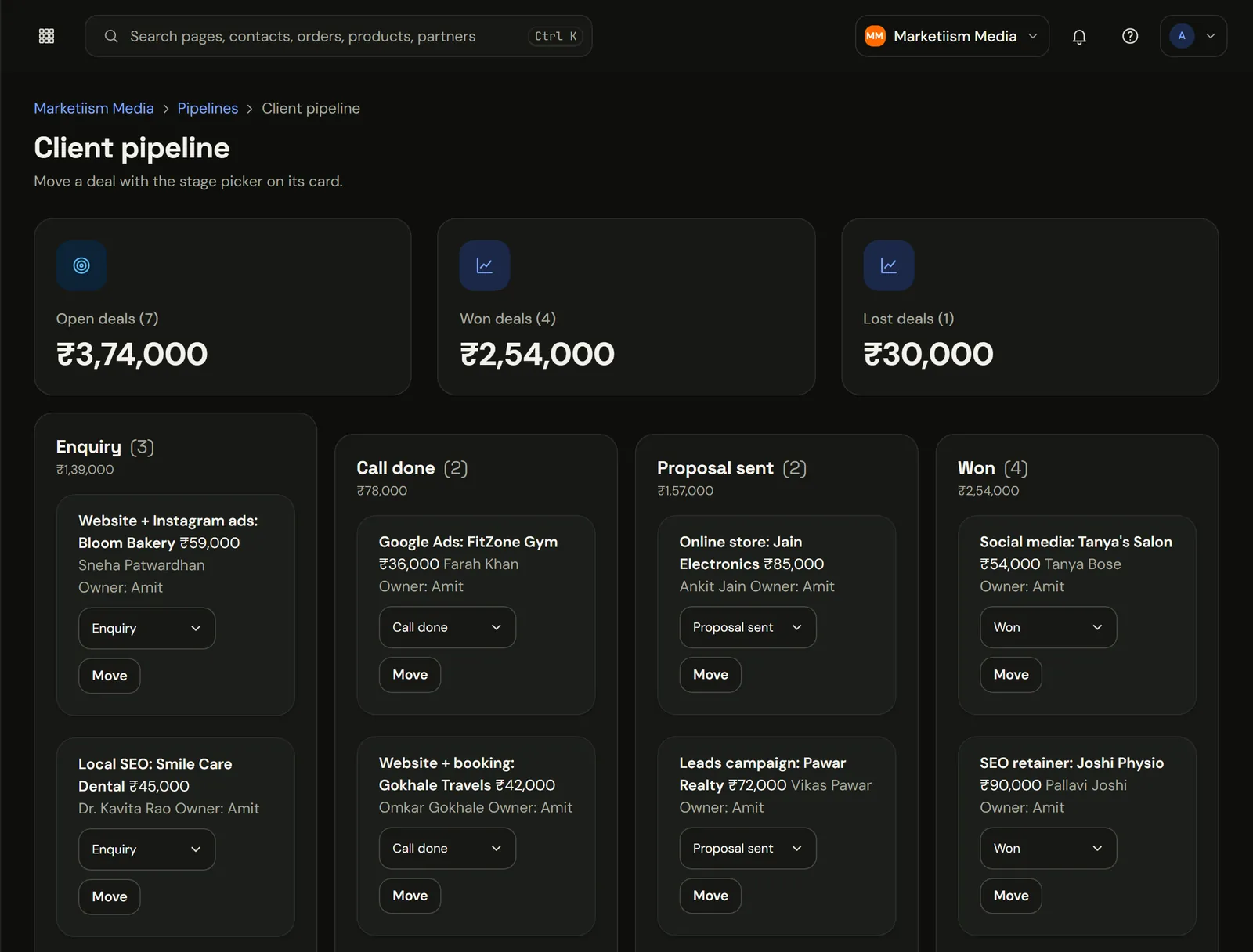
Client pipeline in Marketiism with deal values in rupees at each stage
The real app, recorded in our own Marketiism Media workspace. Client names are sample data.

Every lead and what happened to them.

A lead filled your form, chatted on WhatsApp, didn't pay, then came back two weeks later. Today that's three apps and a guess. Here it's one timeline on one contact, in order.

What does CRM & Pipelines cost?

CRM & Pipelines comes with Marketiism plans from ₹999 a month, before 18% GST. Every plan starts with 14 days free and no card. Limits differ by plan.

Compare plans, limits and add-ons
  • Starter₹999 a monthOne business, one or two people answering customers.
  • Growth₹2,999 a monthA small team that sells every day.
  • Agency₹9,999 a monthAgencies running many clients.

What it does

A timeline nobody has to type

Form fills, WhatsApp chats, emails, payments and course progress land on the contact by themselves. Your team adds notes, not data entry.

Boards that match how you sell

Name your own stages (Enquiry, Site visit, Token paid). Drag deals across. See the rupee value of each column.

A short list of who to call today

Leads who opened the brochure, replied on WhatsApp or came back to the pricing page float to the top.

What Ayesha's record looks like by Wednesday

A Pune dental clinic running a Diwali cleaning offer. Nobody typed any of this.

  • Form

Monday

What comes in
Ayesha fills the offer page form
What runs on its own
Contact created, source: Instagram ad
What you get
Deal opens in Enquiry, ₹1,200
  • WhatsApp

Tuesday

What comes in
"Does it hurt? Can my husband come too?"
What runs on its own
Chat lands on the same contact
What you get
Front desk replies, sees the whole history
  • Paid

Wednesday

What comes in
She pays the ₹200 token
What runs on its own
Deal moves to Booked, reminder scheduled
What you get
Saturday's list is ready before she walks in

Simple enough that the team actually uses it

  • Stages in your own words

    Enquiry, Site visit, Token paid, Booked. Drag deals across. Each column shows its rupee total, so Monday's meeting takes five minutes.

  • Fields that fit your trade

    Treatment, budget, flat size, batch, vehicle number. Whatever you used to scribble in the margin.

  • Tasks with an owner

    Call back Thursday, assigned to Rohit. The task list shows who's due today, so follow-ups stop living in people's heads.

  • Segments you can message

    Visited in the last six months. Paid but no review yet. Use them for a broadcast or an automation.

How far each plan goes

How far each plan goes
FeatureStarter ₹999Growth ₹2,999Agency ₹9,999
Contacts1,00010,000Unlimited
Team members210Unlimited
Pipelines, tasks, notes, segmentsYesYesYes
Active automations3UnlimitedUnlimited
Separate workspace per clientNoNoYes

From the Excel sheet to a working board

  • 01

    Export your sheet

    Save it as CSV from Excel or Google Sheets.

  • 02

    Import and tag

    Match each column to a field and tag the batch, say 'old list'.

  • 03

    Name your stages

    Use the words your team already says out loud.

  • 04

    Switch on one follow-up

    A WhatsApp the morning after every new enquiry. Start there.

Works well with

Engage

WhatsApp Inbox

Put your business number on Meta's official Cloud API. Your whole team replies from one inbox, and the AI covers nights.

  • Meta's price, no markup
  • One inbox, many people
  • Broadcasts that don't get you banned
AI & Automation

Automations

Wait, branch, send a message, add a tag, create a task. Workflows that run across every app here.

  • One canvas, readable by anyone
  • Start from a recipe
  • A log of every run
Grow

Ads & Revenue Tracking

Follow a rupee from the ad click to the lead, the sale and the renewal, per contact.

  • From click to payment
  • Purchases sent back to Meta
  • Reports that answer one question each

Questions people ask

What is CRM & Pipelines?

It's where every lead lives, with everything that happened to them in order: the form they filled, the WhatsApp chat, the booking, the follow-ups and any payment. Your team adds notes, not data. It replaces the Excel sheet and the diary, and it's in every plan.

  • 1,000 Contacts on Starter. 10,000 on Growth, unlimited on Agency.
  • CSV Import your old sheet. Match columns, tag the import, done.
  • Any Number of pipelines. Your own stages, rupee totals per column.
  • India Where it's stored. Each business in its own workspace.
What is a CRM?
A CRM, or customer relationship management tool, is one place that keeps every customer and lead with their history: calls, chats, payments and next steps. Marketiism includes a CRM built for Indian small businesses, where WhatsApp chats, bookings, follow-ups and payments land on the contact automatically.
Is the CRM included in every plan?
Yes. Every plan includes contacts, pipelines, tasks, notes and segments. Starter covers 1,000 contacts and two team members, Growth covers 10,000 contacts and ten team members, and Agency has no limit at all. Every plan starts with a 14-day free trial, and we don't ask for a card.
Can I import my Excel sheet of leads?
Yes. Save your sheet as a CSV file and import it from the contacts screen. You match each column to a field, such as name, phone, city or your own custom field, and choose a tag for the import so you can find those contacts again later.
Can I create my own pipeline stages?
Yes. Name stages to match how you sell, such as Enquiry, Site visit, Token paid and Booked, and reorder them whenever you like. Each deal shows its value in rupees, and each column shows the total, so you can see what is waiting at every step.
Do WhatsApp chats appear in the CRM?
Yes. Every WhatsApp conversation is linked to a contact, and the contact's timeline shows the chat alongside form fills, bookings, payments and notes. Whoever replies can see the customer's full history, so nobody asks the same question twice or misses the fact that the customer already paid.
Can I assign leads to my sales team?
Yes. Assign any contact, deal or task to a team member, and it appears in their own list with its due date. Automations can also route new leads by source or service, for example sending property sale enquiries to one person and rental enquiries to another, without anyone sorting them by hand.
Does it remind my team to follow up?
Yes. Tasks have due dates and owners, and the task list shows what is due today. With Automations, the follow-up itself can go out on WhatsApp after a set delay, and a task is created for a person only if the customer still hasn't replied.
Can I track which ad brought a lead?
Yes. The source, campaign and ad details from the visit are saved on the contact when the lead comes in. Revenue Analytics then joins those details to real payments. You can see which campaign brought customers who actually paid, and not only the ones who filled a form.
Is my customer data safe?
Your data is stored on servers in India with daily backups. Each business works in its own workspace, and automated tests check on every code change that one workspace can never read another's data. Team members only see the workspaces they have been invited to, and secrets are encrypted.
Can I export my contacts?
Yes. You can export contacts and their fields as a CSV file at any time, from the contacts screen. Your customer list belongs to you, and if you ever leave Marketiism you can take it with you. The data deletion page then explains how to remove everything we hold.
Does the CRM work on a phone?
Yes. The console works in your phone's browser. You can check a contact, move a deal, add a note or reply on WhatsApp from a mid-range Android phone. Several screens are also available in Hindi and Marathi for staff who are more comfortable reading them than English.
How is this different from Zoho CRM?
Zoho CRM is a general CRM that connects to other tools. The Marketiism app has the CRM, the WhatsApp inbox, bookings, automatic follow-ups and payments built on one contact list, so nothing needs connecting. It is priced in rupees from ₹999 a month before GST.
Can I keep notes that customers can't see?
Yes. Notes on a contact or a deal are internal and visible only to your team. In the WhatsApp inbox you can also leave an internal note on a chat, for example asking a colleague to call the customer back, without the customer ever seeing it on their phone.
Can I run more than one pipeline?
Yes. Create separate pipelines for the different things you sell, such as treatments and memberships, or new sales and renewals. Each pipeline has its own stages and rupee totals, and one contact can have open deals in several pipelines at the same time without any duplicate records.
Can I use the CRM for broadcasts?
Yes. Build a segment from contact fields, tags, pipeline stage or last visit date, then send a WhatsApp broadcast or an email campaign to that segment. Only contacts who opted in receive WhatsApp templates, which keeps your number's quality rating healthy and your messages welcome.

Try CRM & Pipelines on your own business.

14 days free, no card. If you get stuck setting up WhatsApp, we'll get on a call and do it with you.