

Automations

The follow-ups you keep meaning to do, done every time.

Wait, branch, send a message, add a tag, create a task. Workflows that run across every app here.

Instead of: Zapier, Pabbly, a staff member's memory.
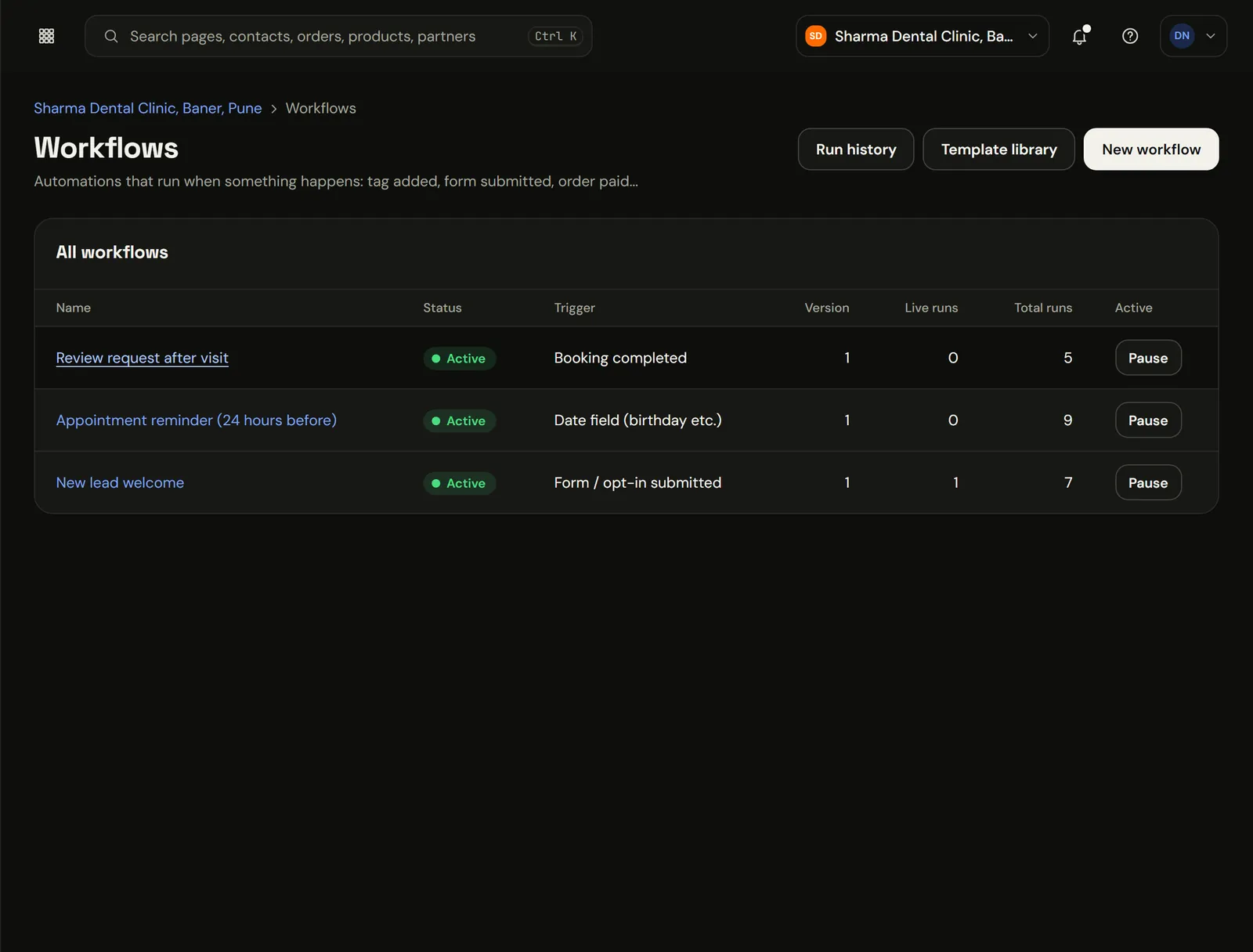
Marketiism workflows: review requests, appointment reminders and a welcome for new leads, each with its trigger and runs
The real app, in a sample clinic workspace. Patient names and numbers are sample data.

If this happens, do that. Every time.

Someone adds a ₹2,400 order to the cart and closes the tab. Thirty minutes later they get a WhatsApp with the cart link. If they pay, they're tagged as a customer. If not, the next day they get a coupon. Nobody on your team had to remember.

What does Automations cost?

Automations comes with Marketiism plans from ₹999 a month, before 18% GST. Every plan starts with 14 days free and no card. Limits differ by plan.

Compare plans, limits and add-ons
  • Starter₹999 a monthOne business, one or two people answering customers.
  • Growth₹2,999 a monthA small team that sells every day.
  • Agency₹9,999 a monthAgencies running many clients.

What it does

One canvas, readable by anyone

Triggers, waits, conditions and actions laid out top to bottom. Your office manager can read it and change the delay from 30 to 45 minutes.

Start from a recipe

Abandoned cart, webinar reminders, appointment reminders, birthday offers and win-back messages are ready to switch on and adjust.

A log of every run

Every run is recorded and retried safely if something fails, so a customer never gets the same message twice.

The abandoned payment flow

This runs a few hundred times a month for a small online store. Nobody on the team touches it.

When

What comes in
Checkout started, not paid
What runs on its own
Wait 30 minutes
What you get
WhatsApp: your cart is saved, pay here

Then check

What comes in
Paid within 24 hours?
What runs on its own
Yes: tag as customer and stop
What you get
No duplicate messages to people who paid

If not

What comes in
Still unpaid next day
What runs on its own
Send a 10% coupon, create a task for Rohit
What you get
A person calls only the ones worth calling

The ones most businesses switch on first

  • Appointment reminders

    The evening before, with a reschedule link. Cuts no-shows without a phone call.

  • Webinar reminders

    A day, an hour and five minutes before. More of the people who registered actually turn up.

  • Abandoned cart

    Thirty minutes later on WhatsApp, a coupon the next day if they still haven't paid.

  • Birthday offers

    A month before the date, for bakeries, salons and restaurants.

  • Win-back

    Nobody's visited in 45 days? A friendly message with a reason to come back.

  • Lead follow-up

    Day one, day three, day seven. Polite, short, and it stops the moment they reply.

Readable by your office manager

  • 01

    Pick a trigger

    Form filled, booking made, payment failed, tag added, date reached.

  • 02

    Add waits and checks

    Wait 30 minutes. Did they pay? Are they tagged VIP?

  • 03

    Add actions

    Send a WhatsApp or email, add a tag, move the deal, create a task.

  • 04

    Switch it on

    Watch the run log for the first few days, then leave it alone.

Ten jobs the AI can take on, when you're ready

All ten start switched off. Turn on the ones you want; by default they ask you before acting.

Missed-enquiry rescue

Spots enquiries nobody answered and drafts the reply.

Lead follow-ups

Day one, three and seven nudges for quiet leads.

Hot-lead alert

Tells you when someone is clearly ready to buy.

Morning brief

What needs you today, in one message.

Review drafts

Replies to new Google reviews, ready to approve.

Payment reminders

Polite nudges for unpaid invoices.

Automations by plan

Automations by plan
FeatureStarterGrowthAgency
Active automations at once3UnlimitedUnlimited
Recipes and run logYesYesYes
AI stepsNoYesYes
Autopilot (AI Team add-on, ₹499/mo)NoYesYes
Separate workspace per clientNoNoYes

Works well with

Engage

WhatsApp Inbox

Put your business number on Meta's official Cloud API. Your whole team replies from one inbox, and the AI covers nights.

  • Meta's price, no markup
  • One inbox, many people
  • Broadcasts that don't get you banned
Sell

CRM & Pipelines

A list of every lead, a board of every deal, and a timeline that fills itself from forms, chats and payments.

  • A timeline nobody has to type
  • Boards that match how you sell
  • A short list of who to call today
AI & Automation

AI Assistant

An assistant that answers customers on WhatsApp and your website chat using your prices and timings, books appointments and hands over to your team when it isn't sure.

  • Books the slot, sends the payment link
  • Replies in the customer's language
  • Only says what you've told it

Questions people ask

What are Automations?

Automations are the follow-ups you keep meaning to do, done every time. You lay out a simple flow (when this happens, wait, check, send a WhatsApp, tag the contact, create a task) and it runs across the inbox, CRM, bookings and payments. Starter runs three at once; Growth and Agency have no limit.

  • 3 Active on Starter. Unlimited on Growth and Agency.
  • Recipes Ready to switch on. Cart, reminders, birthdays, win-back.
  • Every run Logged. Retried safely if a step fails.
  • Off Autopilot until you say so. Ask me first, by default.
What is marketing automation?
Marketing automation means letting software send the follow-ups, reminders and offers that someone on your team would otherwise have to remember. In Marketiism you set a trigger, such as a form fill or a missed payment, and the flow sends WhatsApp or email messages, updates the CRM and creates tasks.
How many automations can I run?
Starter runs up to three automations at the same time, which covers reminders, lead follow-up and one more. Growth and Agency have no limit. Paused automations don't count. You can keep drafts and seasonal flows ready without hitting the cap. Upgrading to Growth lifts the limit straight away.
Do I need to know coding?
No. Flows are laid out top to bottom with plain steps: when this happens, wait, check something, then do something. Most people start from a ready recipe, such as appointment reminders, and only change the wording and the delay before switching it on. You can test a flow on yourself first.
What can start an automation?
Common triggers include a form fill, a new WhatsApp chat, a booking, a payment or a failed payment, an abandoned checkout, a tag being added, a deal changing stage, course progress and a date such as a birthday or a renewal. You can combine a trigger with conditions.
Will a customer get the same message twice?
No. Every run is recorded, steps that fail are retried safely, and a flow won't send the same step twice to the same contact for the same event. Checks such as 'paid within 24 hours' also stop messages to people who have already done the thing you asked.
Does the follow-up stop when the customer replies?
It can, and for lead follow-ups it should. Add a check for a reply before each message, so a person who answered on day two doesn't get the day-three nudge. The chat then sits in the shared inbox for your team to continue by hand.
Can automations send WhatsApp messages?
Yes. Automations send approved WhatsApp templates, or normal messages inside the 24-hour window after a customer writes to you. Meta bills its template charges to you directly at its own rates, and Marketiism doesn't add any markup on those messages. Messages go only to people who agreed to hear from you.
What is Autopilot?
Autopilot is ten ready jobs the AI can do for you, such as rescuing unanswered enquiries, following up quiet leads and drafting review replies. It is part of the AI plan, ₹499 a month on any plan with 300 runs. All ten start switched off and ask before acting.
Can I see what an automation did?
Yes. Every automation has a run log showing each contact that entered it, the steps it took, when, and whether each step worked. If a WhatsApp template was rejected or a payment link failed, you see it there instead of finding out from an annoyed customer.
Is this a replacement for Zapier or Pabbly?
For anything inside Marketiism, yes, because the inbox, CRM, bookings, payments and courses already share one contact list and don't need connecting. For outside tools, Growth and Agency plans include signed webhooks and a REST API that you can still use with Zapier. Most small businesses never need them.
Can I send emails as well as WhatsApp?
Yes. Flows can send emails from your own sender domain as well as WhatsApp templates, and you can mix them, for example a WhatsApp reminder and an email with the full details. Sender-domain checks help your email land in the inbox rather than spam. Opt-outs are honoured on both channels.
Can automations create tasks for my team?
Yes. Add a 'create task' step to assign a call or a check to a person, with a due date. This is useful when automation should stop and a human should step in, for example after two unanswered reminders on a high-value quote. The task shows up in that person's own list.
Can I use dates such as birthdays and renewals?
Yes. Store a date on the contact, such as a birthday, last visit or membership end, and start a flow a set number of days before or after it. Bakeries, salons, gyms and pest control firms use this for birthday offers, rebooking and renewal reminders.
Can I copy automations to another business?
Yes, on the Agency plan. Save a workspace setup, including its automations, as a snapshot and load it into a client's workspace. Agencies use this to roll out a proven clinic or coaching setup to the next client in minutes instead of rebuilding it by hand.
Do automations work on the Starter plan?
Yes, with up to three active at a time. That is enough for booking reminders, a new-lead follow-up and one more, which covers what most small businesses need first. AI steps and Autopilot need the Growth or Agency plan. You can pause one and switch on another whenever your needs change.

Try Automations on your own business.

14 days free, no card. If you get stuck setting up WhatsApp, we'll get on a call and do it with you.