

AI Assistant

Someone to answer WhatsApp at 11pm who knows your prices.

An assistant that answers customers on WhatsApp and your website chat using your prices and timings, books appointments and hands over to your team when it isn't sure.

Instead of: A night-shift receptionist, the ChatGPT tab.
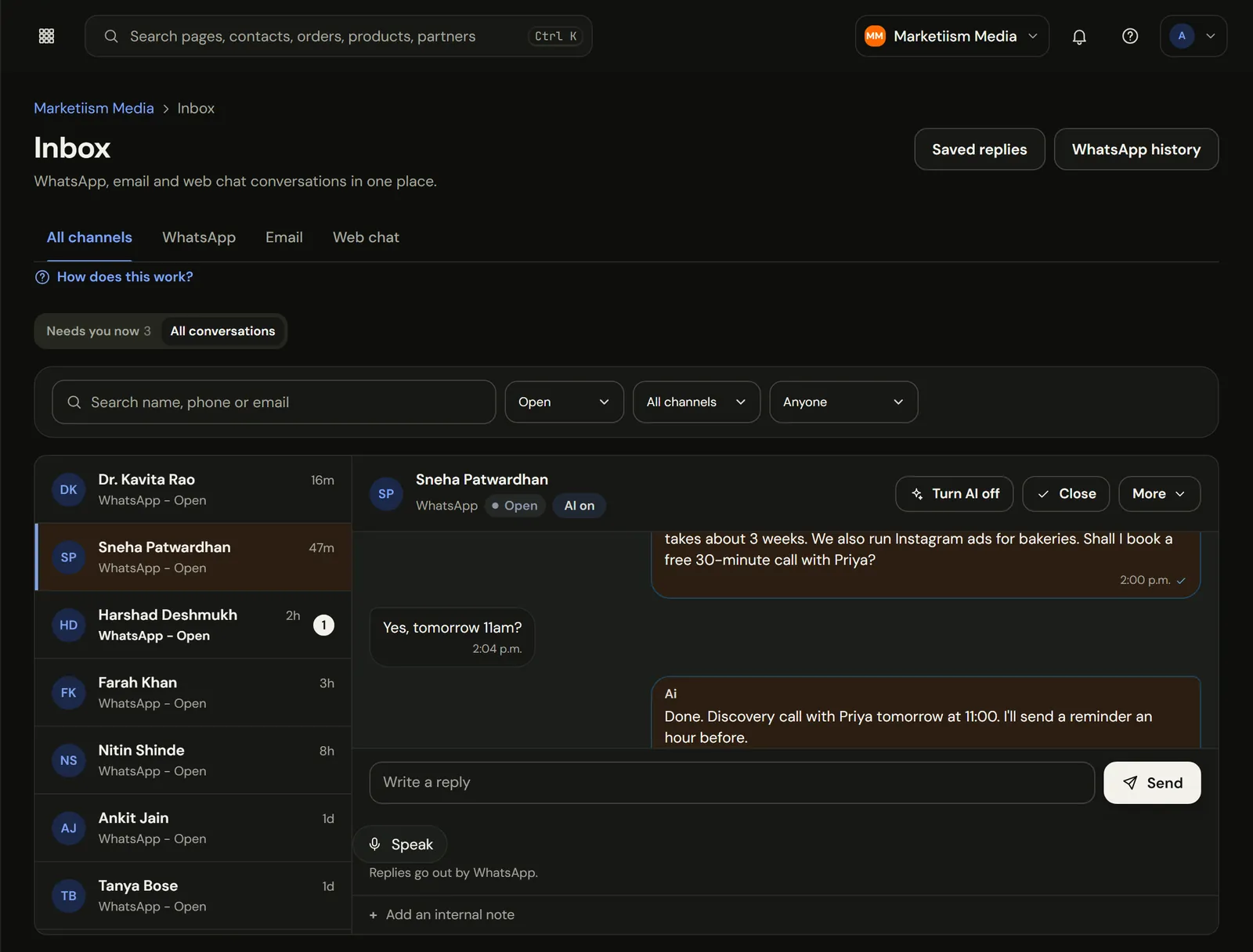
Marketiism inbox: the AI answers a website enquiry on WhatsApp and books a call
The real app, recorded in our own Marketiism Media workspace. Client names are sample data.

Answers chats and books slots, day and night.

A patient messages at 11pm asking if Saturday 4pm is free. The reply goes out, the slot is booked, and the reminder is set before you wake up. If they ask something it doesn't know, it says so and leaves the chat for your team in the morning.

What does AI Assistant cost?

AI Assistant comes with Marketiism plans from ₹999 a month, before 18% GST. Every plan starts with 14 days free and no card. Limits differ by plan.

Compare plans, limits and add-ons
  • Starter₹999 a monthOne business, one or two people answering customers.
  • Growth₹2,999 a monthA small team that sells every day.
  • Agency₹9,999 a monthAgencies running many clients.

What it does

Books the slot, sends the payment link

It checks your open slots for the service and staff member, books the one the customer picks, sets the reminder and can send a payment link for a token amount.

Replies in the customer's language

Hindi, Hinglish, Marathi, Tamil and more. It replies in the language the customer wrote in.

Only says what you've told it

Answers come from your services, prices, timings and FAQs. If the answer isn't there, it hands over to a person instead of guessing.

Three chats at 11pm

  • Answers

"Saturday 4pm free hai?"

What comes in
A patient asks for a slot, in Hinglish
What runs on its own
Checks the calendar, offers 4:00 and 4:30
What you get
Booked, reminder set for Friday evening
  • Answers

A voice note about prices

What comes in
Forty seconds asking about braces
What runs on its own
Understands it, replies with your price range
What you get
Lead tagged, consult offered
  • Hands over

"My tooth is bleeding"

What comes in
Something it shouldn't advise on
What runs on its own
Says a doctor will call, alerts your team
What you get
A person takes it from there

It only says what you've told it

  • Your knowledge, nothing else

    Services, prices, timings, areas served, FAQs. If the answer isn't there, it says so and leaves the chat for your team.

  • Every chat readable

    Open any conversation and see exactly what it said. Update its knowledge and the next answer uses it.

  • You can take over any time

    Reply yourself and it steps back on that chat. No talking over each other.

  • Drafts wait for you

    Campaigns, posts and review replies it writes are drafts. Nothing goes out until you approve it.

Helpers for the jobs you keep postponing

₹499 a month on any plan, with 300 runs included and ₹3 per run after that. Everything they produce is a draft for you to approve.

Helpers for the jobs you keep postponing
FeatureWhat it does
Customer supportDrafts replies to tricky customer messages
Website and SEOSuggests page fixes and writes service page drafts
Email marketerDrafts campaigns and follow-up sequences
Landing page writerWrites offer pages from a short brief
Festival plannerPlans Diwali, Eid or wedding-season campaigns ahead of time
GST guideExplains GST questions in plain words, for your CA to confirm
Hiring helperDrafts job posts and screening questions

An hour of setup, then small corrections

  • 01

    Add your basics

    Services, prices, timings, location and how to book.

  • 02

    Paste your FAQs

    The questions your front desk answers every day.

  • 03

    Set the handover rules

    Medical, legal, refunds, complaints: always to a person.

  • 04

    Read the first week

    Fix any answer you don't like by updating its knowledge.

Runs on Google's Gemini modelsYour business knowledge stays in your workspace and is used to answer your customers, not to advertise to them.

Works well with

Engage

WhatsApp Inbox

Put your business number on Meta's official Cloud API. Your whole team replies from one inbox, and the AI covers nights.

  • Meta's price, no markup
  • One inbox, many people
  • Broadcasts that don't get you banned
AI & Automation

AI Team & Autopilot

Ready-made AI helpers that write posts, reply to reviews, follow up leads, chase payments and explain your numbers, plus Autopilot jobs that prepare the work and wait for your OK.

  • 17 helpers, each with one-press jobs
  • Autopilot: 10 jobs on a schedule
  • Ask me first, by default
  • Uses your own data
  • English, Hindi and Marathi
Run

Online Bookings

A booking page for your services, a calendar for each staff member, weekly hours and holidays, and reminders so people turn up.

  • Your own booking page
  • Calendars per person
  • Reminders before every visit
  • Booked from a WhatsApp chat
  • Every visit on the customer's record

Questions people ask

What is the AI Assistant?

It's an assistant that answers your customers on WhatsApp using only your prices, timings and FAQs, books appointments, and hands the chat to a person when it isn't sure. It replies in the customer's language and understands voice notes. It comes with Growth and Agency; the AI Team add-on adds 17 helpers.

  • 24×7 Answers on WhatsApp. Including 11pm on a Sunday.
  • Your facts Its only source. Hands over instead of guessing.
  • 17 AI Team helpers. ₹499/mo add-on, 300 runs included.
  • Hindi, Marathi And Hinglish, Tamil and more. Replies in the customer's language.
What does the AI Assistant do?
It answers customer messages on WhatsApp using the services, prices, timings and FAQs you give it. It can book appointments into your calendar, collect details, and hand the chat to a person when a question falls outside what it knows. Campaign drafts come from the separate AI Team add-on, and you approve them first.
Will the AI say something wrong to my customers?
It is built not to guess. It only answers from the knowledge you add, and when a question isn't covered, such as a medical or refund question, it tells the customer a person will reply and alerts your team. You can read every conversation and correct it.
Which plans include the AI Assistant?
The AI Assistant is part of the AI plan: ₹499 a month before GST, added to any plan (Starter, Growth or Agency). It includes 300 runs a month, then ₹3 a run, and covers AI replies, AI Team and the AI operator. You can switch it on or off any month.
What is the AI Team add-on?
AI Team comes with the AI plan, which you can add to any plan. It has 17 helpers, such as a landing page writer, an email marketer, a festival planner and a GST guide. It costs ₹499 a month with 300 runs included, then ₹3 a run.
Which languages does it reply in?
It replies in the language the customer wrote in, including English, Hindi, Hinglish, Marathi, Tamil and other Indian languages. If a customer switches language mid-chat, it switches too. Your knowledge can be written in English; it translates the answer, not the facts. Customers often find that more welcoming.
Can it understand WhatsApp voice notes?
Yes. When a customer sends a voice note, the AI understands what was said and replies in text, in the same language. This matters in India, where many customers would rather speak for thirty seconds than type a long question on a small phone keyboard.
Can it book appointments?
Yes. Connected to your bookings, it checks free slots for the service and staff member, offers options, books the one the customer picks and sets the reminder. If the customer wants something unusual, such as a home visit, it passes the chat to your team.
What happens when I reply myself?
The AI steps back. When someone on your team replies in the shared inbox, or from the WhatsApp Business app on your phone, the AI pauses on that chat, so you never talk over each other. You can hand the chat back to the AI when you are done.
Does it send campaigns on its own?
No. The AI Assistant answers customers; it does not send campaigns. The AI Team add-on can draft a campaign such as a Diwali offer, and nothing is sent until you review and approve it. Autopilot jobs also ask you before acting, unless you change that.
Which AI model does it use?
It runs on Google's Gemini models. Your business knowledge is stored in your own workspace and sent to the model only to answer your customers' questions. We don't use one business's knowledge to answer another business's customers. Conversations stay inside your workspace, and you can read every one of them.
How do I teach it about my business?
Fill in your services, prices, timings, location and booking rules, then paste the questions your team answers every day. Most businesses spend about an hour. After that, read the first week of chats and correct any answer you don't like. Keep prices current, because it answers from whatever you've written.
What does a run mean in AI Team?
A run is one job done by an AI Team helper, such as drafting one email campaign or one landing page. The add-on includes 300 runs a month for ₹499, and extra runs cost ₹3 each, charged from your wallet. Customer replies by the AI Assistant are part of your plan.
Can it reply to Google reviews?
It drafts replies to new Google reviews through the Autopilot review job, once your Google Business Profile is connected. You approve each reply before it is posted, so a thank-you to a happy customer and a careful answer to an unhappy one both sound like you.
Is it suitable for clinics and medical questions?
Yes, for booking, timings, fees and preparation instructions. Set medical questions to always go to a person: the AI then tells the patient a doctor or staff member will reply and alerts your team. It should never give medical advice, and it is set up not to.
Can I switch the AI off?
Yes, at any time, for the whole workspace or for a single chat. You can also set it to answer only outside your working hours, so your team handles chats during the day and the AI covers the nights and Sundays when nobody is at the desk.

Try AI Assistant on your own business.

14 days free, no card. If you get stuck setting up WhatsApp, we'll get on a call and do it with you.