

Checkout & Billing

Get paid on UPI and send a proper GST invoice without opening Tally.

Checkout on Razorpay, Cashfree or Stripe with UPI first, UPI AutoPay for monthly fees, coupons, order bumps and GST invoices on every order.

Instead of: Instamojo, payment links pasted in chat, manual invoices.
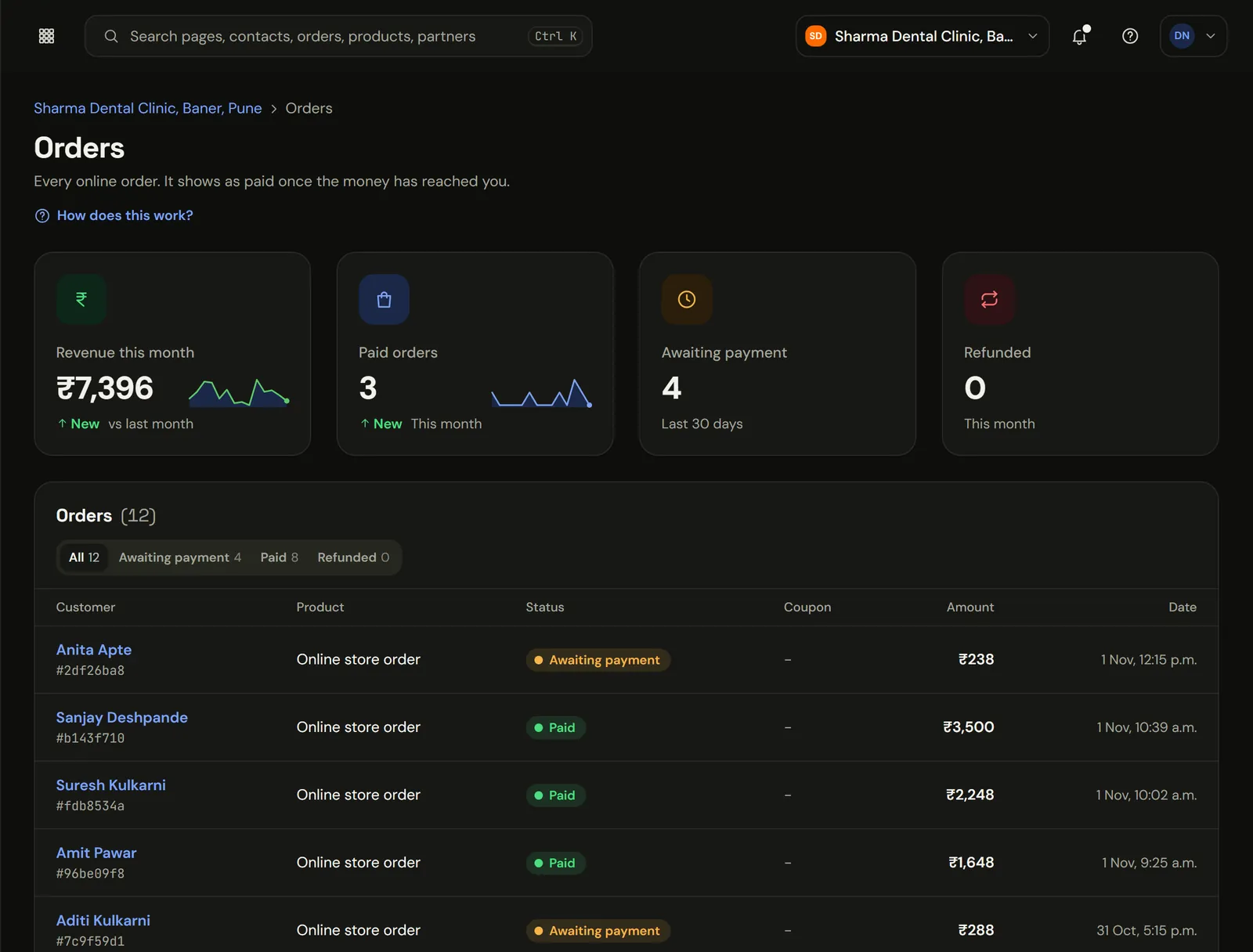
Marketiism orders: revenue this month, paid and waiting orders, and each payment
The real app, in a sample clinic workspace. Patient names and numbers are sample data.

UPI, subscriptions and GST invoices.

A student pays ₹4,999 for your course at 10pm. They get access straight away, a GST invoice lands in their email, and your CA finds the entry already numbered at month end.

What does Checkout & Billing cost?

Checkout & Billing comes with Marketiism plans from ₹999 a month, before 18% GST. Every plan starts with 14 days free and no card. Limits differ by plan.

Compare plans, limits and add-ons
  • Starter₹999 a monthOne business, one or two people answering customers.
  • Growth₹2,999 a monthA small team that sells every day.
  • Agency₹9,999 a monthAgencies running many clients.

What it does

UPI at the top of the page

Connect Razorpay or Cashfree for UPI first, then cards, netbanking and wallets, or Stripe for international cards. UPI AutoPay for monthly fees and memberships.

Small add-ons that add up

Offer a ₹499 onboarding call or a printed workbook as a one-tick order bump. Offer an upsell after payment, without re-entering details.

Invoices your CA will accept

Correct CGST/SGST or IGST split, your GSTIN, sequential numbering and a monthly export.

A ₹4,999 course sale, start to finish

The link

What comes in
Payment link sent from a WhatsApp chat
What runs on its own
UPI shown first, then cards and netbanking
What you get
Paid in under a minute on GPay

The invoice

What comes in
Signed confirmation from the gateway
What runs on its own
GST invoice numbered and emailed as PDF
What you get
Your CA finds it already in sequence

The access

What comes in
Order marked paid on the contact
What runs on its own
Course unlocked, welcome message sent
What you get
Nobody on your team woke up for it

The bits that usually need three tools

  • Your own gateway

    Your keys, your settlement. Card and UPI details never touch our servers.

  • Subscriptions

    UPI AutoPay or card mandates for gyms, classes and retainers, with a self-serve portal.

  • Order bumps and upsells

    A ₹499 add-on with one tick. An upsell after payment without typing card details again.

  • Coupons

    Festival codes, referral codes, first-order codes.

  • Refunds and credit notes

    Refund from the order screen; the credit note writes itself.

  • Abandoned checkouts

    A WhatsApp reminder thirty minutes later, to people who opted in.

Which tax goes on the invoice

The rate comes from the product or service you set up. The split comes from the place of supply.

Which tax goes on the invoice
FeatureSame stateDifferent state
ExamplePune seller, Mumbai buyerPune seller, Bengaluru buyer
Tax on ₹10,000 at 18%₹900 CGST + ₹900 SGST₹1,800 IGST
Customer pays₹11,800₹11,800
RefundCredit note, same splitCredit note, IGST

Billing that isn't only online

  • Fast invoice entry

    Item search, party picker, live total.

  • Offline POS

    Keeps billing when the internet drops, syncs later.

  • Price levels

    Dealer and wholesale prices per customer.

  • Accountant role

    Read-only access for your CA.

Works well with

Grow

Funnels & Sites

Build a landing page, a small website or a full webinar funnel. Type what you want or drag blocks around.

  • Start from a sentence, then edit by hand
  • The whole funnel in one place
  • Light pages for 4G phones
Run

Courses & Community

Host video lessons, drip them out week by week, run a paid community, and nudge students who stall.

  • Lessons only enrolled students can open
  • Memberships with a place to talk
  • Follow-ups based on progress
Grow

Ads & Revenue Tracking

Follow a rupee from the ad click to the lead, the sale and the renewal, per contact.

  • From click to payment
  • Purchases sent back to Meta
  • Reports that answer one question each

Questions people ask

What is Checkout & Billing?

It's how you get paid and invoiced properly. Customers pay on UPI, cards or netbanking through your own Razorpay, Cashfree or Stripe account, and a numbered GST invoice goes out by itself. Monthly fees can run on UPI AutoPay. We don't take a percentage of your sales.

  • 0% Our cut of your sales. Your gateway charges its own fee.
  • 3 Gateways. Razorpay, Cashfree, Stripe.
  • CGST + SGST / IGST Picked by place of supply. Numbered in sequence.
  • AutoPay For monthly fees. UPI mandates and cards.
Which payment gateways work with Marketiism?
Razorpay, Cashfree and Stripe. You connect your own account with your own keys, so payments are settled directly to your bank by the gateway. Razorpay and Cashfree cover UPI, RuPay, Indian cards and netbanking, while Stripe suits customers paying with international cards from outside India.
Do you take a percentage of my sales?
No. Marketiism charges only your monthly or yearly plan, starting at ₹999 a month before GST. The payment gateway charges its own transaction fee under the agreement you have with it, and we add nothing on top of that fee or on top of the order value.
Does every payment get a GST invoice?
Yes. When a payment succeeds, Marketiism creates a numbered GST invoice with your GSTIN, the customer's details and the correct tax split, then emails it as a PDF. Invoices are numbered in sequence, so your CA can export them at month end without fixing numbers.
How does it decide between CGST, SGST and IGST?
It uses the place of supply. When your customer is in the same state as your registration, the invoice splits tax into CGST and SGST. When the customer is in another state, it charges IGST instead. The rate itself comes from the product or service you set up.
Can I collect monthly fees automatically?
Yes. Set up a subscription and customers pay with UPI AutoPay or a card mandate, so monthly fees for gyms, classes or retainers are collected without reminder calls. Customers can update or cancel through a self-serve portal, and each renewal gets its own GST invoice.
What is an order bump?
An order bump is a small extra offered on the checkout page with a single tick box, such as a ₹499 onboarding call or a printed workbook added to a course. Buyers add it without a second payment, and it often raises the average order value with no extra marketing.
Can I send a payment link on WhatsApp?
Yes. Create a payment link for any amount or product and send it from the WhatsApp Inbox, or let an automation send it, for example a fee reminder on the first of the month. When the customer pays, the chat, the payment and the invoice all appear on the same contact.
What happens if a customer abandons the checkout?
Marketiism records the started checkout on the contact. An abandoned-cart automation can send a WhatsApp reminder with the payment link after thirty minutes, then a coupon the next day if they still haven't paid. Messages go only to customers who agreed to hear from you.
How do refunds and credit notes work?
Refund an online payment through the gateway from the order screen. A full or partial refund automatically creates a GST credit note for the exact amount, linked to the original invoice. Your sales and tax figures stay correct, and your CA can see both documents together.
Do card or UPI details reach your servers?
No. Customers pay on the PCI-DSS certified checkout of Razorpay, Cashfree or Stripe, and Marketiism only receives the result of the payment through a signed confirmation from the gateway. Gateway keys you connect are encrypted at rest, and our staff cannot read them in the admin.
Can I accept international payments?
Yes, through Stripe. Connect your Stripe account to accept international cards from customers outside India, for example students of an online course who live in the Gulf, the UK or the US. Indian customers can still pay with UPI through Razorpay or Cashfree on the same checkout.
Can I issue invoices for offline sales too?
Yes. The billing area includes fast invoice entry for counter and phone orders, an offline-capable POS counter that syncs when the internet returns, customer price levels and invoice themes. Bills can be shared on WhatsApp with a Pay by UPI button, so customers can pay straight away.
Can my CA access the invoices?
Yes. Invite your CA with the accountant role, which gives read-only access to billing, GST and accounts. They can see invoices, credit notes and reports whenever they need them, without being able to change any sales, and you no longer have to email spreadsheets back and forth every month.
Do I need to be GST registered to use checkout?
No. Unregistered businesses can take payments and send receipts or bills of supply. If you are registered, add your GSTIN in settings and every invoice will show it with the right tax split. You can change this later when you register, without rebuilding your checkout.
Is Checkout included in the Starter plan?
Yes. Checkout, coupons and GST invoices are included in every plan, from Starter at ₹999 a month before GST. Subscriptions, order bumps and upsells are also available on every plan. All plans start with a 14-day free trial, and we don't ask for a card to begin.

Try Checkout & Billing on your own business.

14 days free, no card. If you get stuck setting up WhatsApp, we'll get on a call and do it with you.